
Create and evaluate formula logic with explicit expected results rather than translating syntax blindly.
Write the Rule in Plain Language
Hypothetical example: an order line multiplies quantity by unit price, excluding tax and delivery. Record those exclusions in the field description. “Order total” would be misleading if another person expects the final amount payable. State the currency and decide where rounding occurs.
Create expected values independently: quantity 3 at price 12.50 produces 37.50 before tax; quantity zero produces zero. A missing price requires a business decision. It might mean incomplete data rather than a free item, so do not silently convert every empty cell to zero.
Create the Field Using Current Syntax
NocoDB’s formula guide uses braces for field references, supports nested formulas and describes formula results as generated rather than directly editable cells. A proposed arithmetic example is {Quantity} * {Unit Price}. Match those field names and types in your own table before evaluating it.
Use the documented function reference for conditions, dates and text operations. An expression from another spreadsheet product may use different functions or coercion rules. Copying a name without checking the expected input and output types is a migration shortcut that can change the result.
Documentation: NocoDB formula fields
Exercise the Cases That Change the Answer
Build a disposable table containing normal values, zero, blanks, a decimal and an invalid text input. Keep the expected answer beside each case. Where behavior is intentionally undefined, the required output is an explicit exception, not an invented number.
For date logic, include a record on the boundary day and record the time-zone assumption. For status logic, include the completed state and an unexpected spelling. These are proposed test cases; this site has not executed them against a NocoDB installation.
- Record each input field and its intended type.
- Write independent expected outputs for at least the boundary cases.
- Create the formula in a separate evaluation table.
- Compare raw output as well as visible formatting.
- Check any export or downstream API consumer that relies on the result.
- Record exceptions before replacing the original calculation.
Protect the Meaning After the First Success
List downstream calculations, reports and integrations that depend on the field. A field rename or type change can be an application change even when it appears to be tidying. Review the dependency list during migration and upgrades.
If several related records contribute to the result, first decide whether the operation belongs in a lookup or rollup. A single-row arithmetic formula and an aggregate over related rows answer different questions. Keep the simpler verified model rather than adding a long expression that hides the relationship.
Hypothetical arithmetic fixture; expected values are examples, not observed NocoDB results
This is an illustrative worksheet to adapt to your own evaluation. It is not a measured product test or a claim about results in your installation.
| Quantity | Unit price | Expected business outcome |
|---|---|---|
| 3 | 12.50 | 37.50 before tax |
| 0 | 12.50 | 0 |
| 3 | Missing | Flag incomplete price |
| 3 | Text instead of number | Reject or repair the input before acceptance |
Use a written rule and a boundary-case fixture. Syntax acceptance and attractive formatting do not establish calculation correctness.
Inspect the official interface evidence
These previously captured interfaces provide orientation. Their versions and dates are distinct from the documentation review above.
Inspect the interface, with its context.
Open a specimen to see the source image and the observations it supports. A vendor demonstration is distinct from a self-hosted installation.
NocoDBHistorical vendor product image · Image identifies v2.3; not the current release
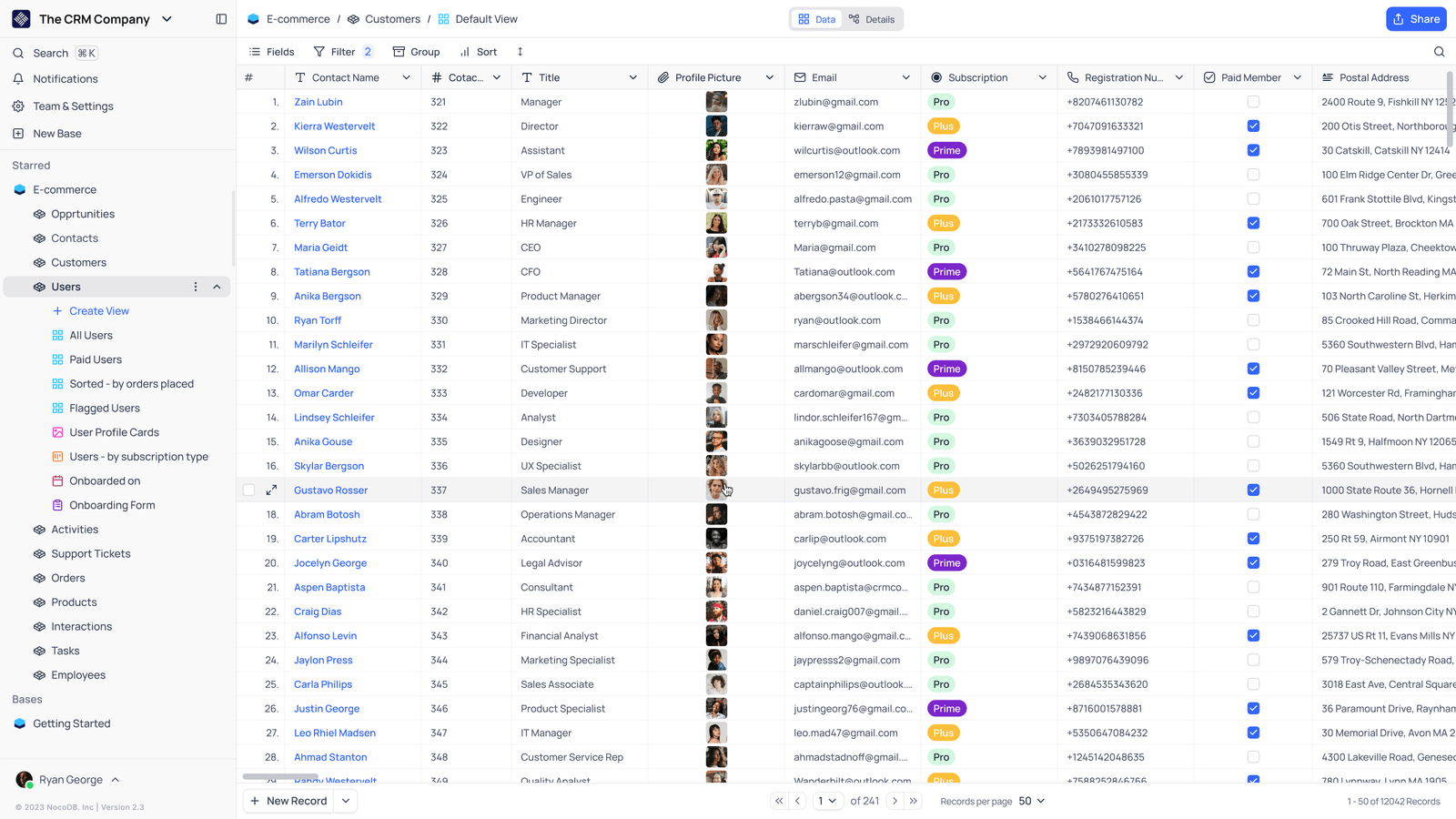
- Saved viewsThe vendor image shows several named views in the left navigation.
- Grid controlsFields, filtering, grouping and sorting appear above the record grid.
- Typed columnsThe example includes text, email and labelled select values. Check the current edition for availability.
Check the facts and their boundaries.
Official documentation supports the product statements. The evaluation procedures and synthetic examples are editorial guidance. We have not independently run the installation, migration or recovery procedures described here.
Formula creation and field-reference syntax; examples here are proposed validation fixtures. Reviewed 2026-11-01.