
Choose the correct relationship operation and validate its meaning.
Model the Relationship First
Current documentation creates new relationships with Link to Another Record; the older Links field is deprecated. Choose cardinality to match the real workflow. A task belonging to one project differs from a person contributing to several projects. Renaming the field does not change that relationship.
Hypothetical fixture: Project P-01 has tasks T-01 and T-02. T-01 has two planned hours; T-02 has three. First verify that each task points to P-01 and that P-01 shows both tasks. Only then build the display or calculation on top.
Documentation: NocoDB Link to Another Record
Use a Lookup When You Need the Values
The lookup documentation describes displaying a field from the related table through a selected link. For the fixture, a project-level lookup of task names should expose both task labels. That is useful for inspection, but it is not itself a total of planned hours.
Choose a stable record identity even when the display label is convenient. Give the fixture two tasks with the same title and different IDs. If the team cannot tell which task is linked, improve the display convention before importing a larger dataset.
Documentation: NocoDB lookup fields
Use a Rollup When You Need an Aggregate
A rollup applies an aggregation to linked values. The documentation distinguishes Count from Count All, and lists different behavior for records with no links. Those details matter when “no task,” “task without an estimate” and “zero hours” have different meanings.
For the hypothetical fixture, the expected sum is five hours. Add T-03 with no estimate and decide whether the report should count three tasks, two estimates or both. Write those expectations first so the interface result can be checked instead of interpreted after the fact.
- Create and inspect the link on each fixture record.
- Confirm lookup values against the related table.
- Choose the aggregation that matches the question.
- Add an unestimated record and an unlinked project.
- Compare observed results with the written expectation.
Documentation: NocoDB rollup fields
Treat Selection Filters as Workflow Aids
The link guide says selection limits affect the picker rather than every method of changing a relationship. Do not treat a filtered choice list as an authorization rule. Conditional lookup or rollup features also have plan-specific availability. Keep the basic model useful before adding those options.
During migration, distinguish an old Links-field upgrade from a new relationship design. Review its specific documented consequences before changing an existing field. This page explains a modeling method, not a completed migration or a claim that every old project can be upgraded without review.
Documentation: NocoDB Link to Another Record
Hypothetical project/task relationship check
This is an illustrative worksheet to adapt to your own evaluation. It is not a measured product test or a claim about results in your installation.
| Question | Field choice | Expected fixture result |
|---|---|---|
| Which tasks belong here? | Link | T-01 and T-02 link to P-01 |
| What are the task labels? | Lookup | Both related labels remain inspectable |
| How much time is planned? | Sum rollup | 2 + 3 = 5 hours |
| How many estimates exist? | Count chosen field | Blank estimates are distinguished from tasks |
Validate the link before trusting a lookup or total. Keep record identity, missing values and access controls separate from presentation.
Inspect the official interface evidence
These previously captured interfaces provide orientation. Their versions and dates are distinct from the documentation review above.
Inspect the interface, with its context.
Open a specimen to see the source image and the observations it supports. A vendor demonstration is distinct from a self-hosted installation.
NocoDBHistorical vendor product image · Image identifies v2.3; not the current release
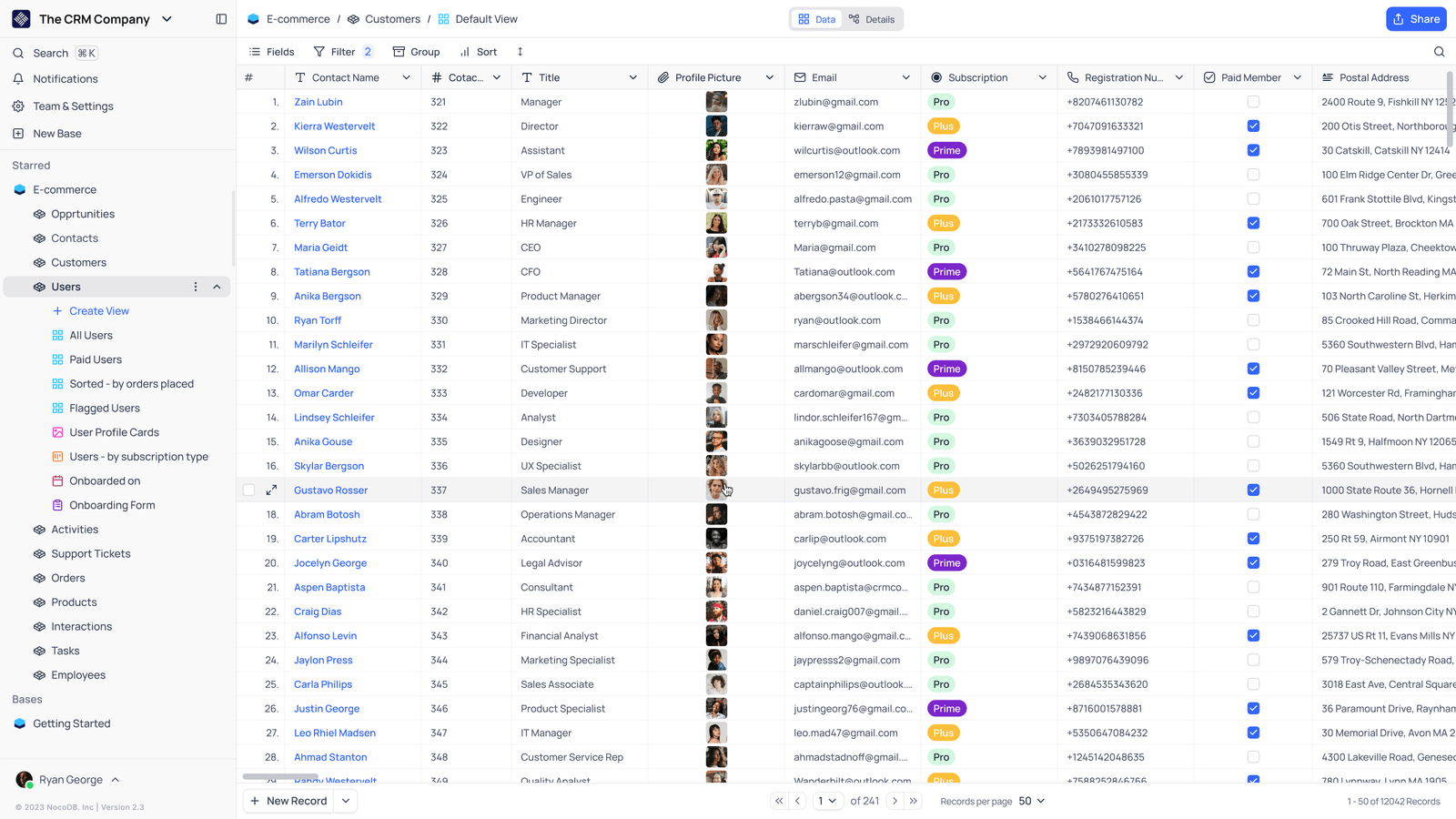
- Saved viewsThe vendor image shows several named views in the left navigation.
- Grid controlsFields, filtering, grouping and sorting appear above the record grid.
- Typed columnsThe example includes text, email and labelled select values. Check the current edition for availability.
Check the facts and their boundaries.
Official documentation supports the product statements. The evaluation procedures and synthetic examples are editorial guidance. We have not independently run the installation, migration or recovery procedures described here.
New link-field model and relationship choices; old Links fields have a separate migration. Reviewed 2026-11-01.
Lookup configuration; conditional options have plan-specific availability. Reviewed 2026-11-01.
Aggregation definitions and empty-set behavior; not a benchmark. Reviewed 2026-11-01.