
Make version changes reproducible and distinguish application rollback from recovering changed data.
Capture the Starting State
Write down application image tags, database version, configuration location, persistent stores and the required maintenance window. Pin a chosen release instead of relying on an unrecorded latest tag. Read changes between the source and target releases, not only the newest announcement.
Hypothetical example: a team uses a form for intake, a nightly reader and linked project totals. Their acceptance checklist needs those three workflows. A person who only opens the homepage after an upgrade could miss a broken integration or a changed calculation.
Check for a Storage-Layout Transition
The current upgrade guide calls out older bind mounts versus newer named volumes. Changing compose layouts can attach empty storage while old data remains elsewhere. It also distinguishes raw Postgres directory movement within the same major version from a dump-and-restore across major versions.
Inspect the existing mounts before replacing deployment files. Keep the old directories and known backups until the new environment has passed acceptance. Do not delete apparently unused data just because a new application starts with an empty workspace. Investigate the connected store first.
Documentation: NocoDB upgrades and storage migration
Rehearse the Change and the Recovery Decision
Restore a representative copy into an isolated environment before a material change. Record the actual command sequence there using the official guidance for your installation. The value of rehearsal is that the sequence and its assumptions become observable, not that a checklist was marked complete.
Define the point at which you will stop rather than continue repairing live. Keep the recovery method compatible with the preserved data. Switching back to an older image does not, by itself, prove that an application can read a database already changed by a newer release.
- Verify the recovery set and the method for restoring it.
- Read target-release changes and compatibility notes.
- Compare old and new storage/configuration mappings.
- Run the change in an isolated representative environment.
- Check forms, API access, files, links and formulas.
- Record the decision to accept, investigate or restore.
Accept the Workflow, Then Close the Change
After the approved change, inspect known records, open files and exercise the integration with its real supported authentication model. Record what was checked, by whom and against which release. A success message without that context is difficult to use during the next incident.
Update the recovery manifest and maintenance notes to match the new layout. Revisit licence and edition assumptions when a release changes those boundaries. This guide is an upgrade planning method; OwnStack Atlas has not executed or certified the upgrade path for your installation.
Hypothetical upgrade acceptance record
This is an illustrative worksheet to adapt to your own evaluation. It is not a measured product test or a claim about results in your installation.
| Check | Evidence to retain | Decision trigger |
|---|---|---|
| Release identity | Before/after tags and database major | Unclear compatibility stops the change |
| Storage mapping | Old/new mounts and protected backup | Empty workspace requires investigation |
| Critical workflow | Known IDs, file and calculation checks | Failed essential task blocks acceptance |
| Recovery | Compatible restored starting point | Older image alone is not proof of rollback |
Preserve a compatible recovery point and test the workflows that matter. Do not confuse a running new container with an accepted upgrade.
Inspect the official interface evidence
These previously captured interfaces provide orientation. Their versions and dates are distinct from the documentation review above.
Inspect the interface, with its context.
Open a specimen to see the source image and the observations it supports. A vendor demonstration is distinct from a self-hosted installation.
NocoDBHistorical vendor product image · Image identifies v2.3; not the current release
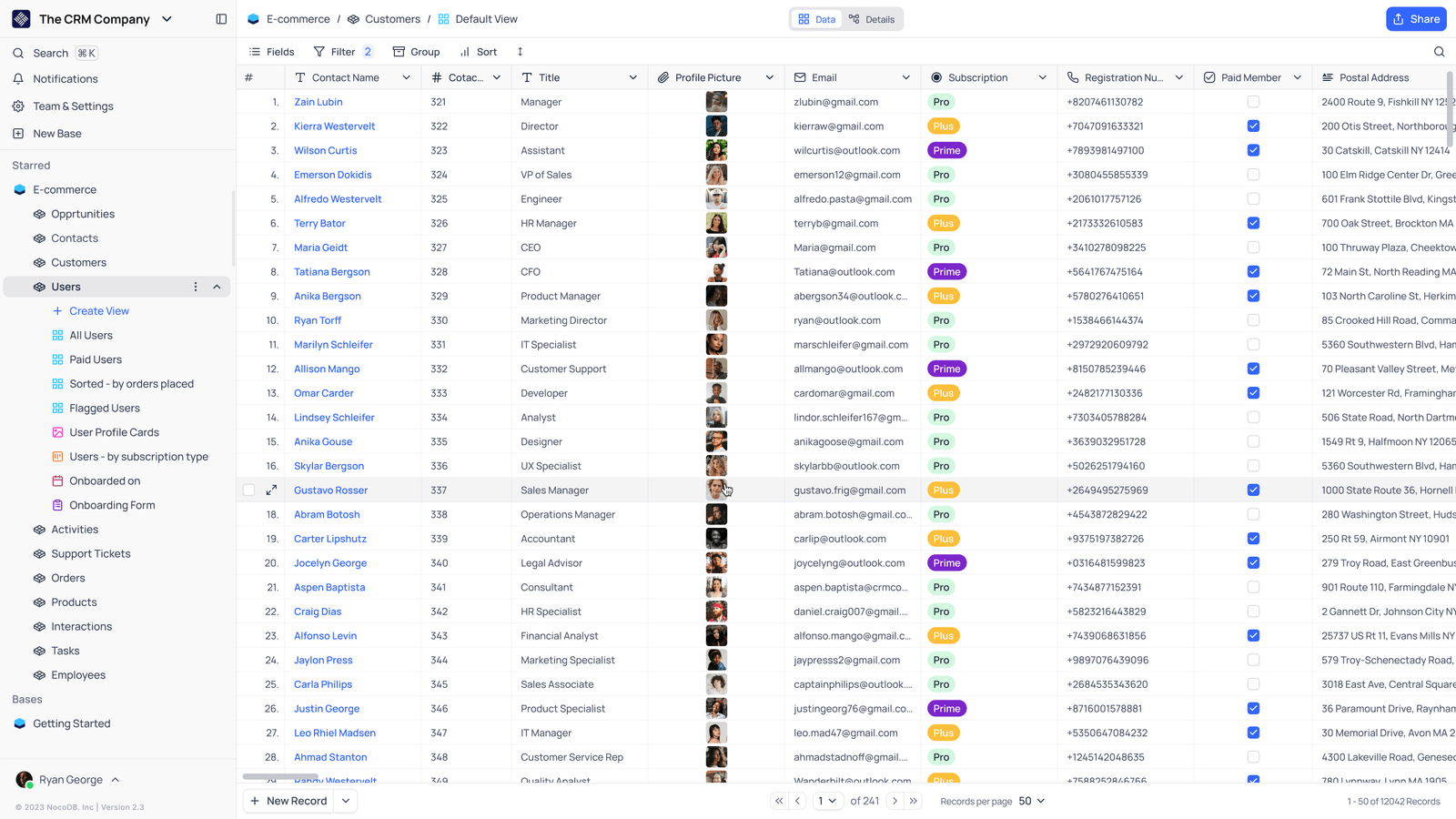
- Saved viewsThe vendor image shows several named views in the left navigation.
- Grid controlsFields, filtering, grouping and sorting appear above the record grid.
- Typed columnsThe example includes text, email and labelled select values. Check the current edition for availability.
Check the facts and their boundaries.
Official documentation supports the product statements. The evaluation procedures and synthetic examples are editorial guidance. We have not independently run the installation, migration or recovery procedures described here.
Current container guidance, bind-mount transition and version pinning; release notes also required. Reviewed 2026-11-01.