
Define the persistent storage boundary of a self-hosted Grist installation.
Identify the Different Kinds of State
The self-hosting guide describes .grist documents under a persistent store, a home database for users/workspaces/document metadata and session state. It explains configurations using PostgreSQL for the home database and Redis for relevant state behavior. These are separate from the information inside each document.
Do not assume a server directory copied from an example matches your deployment. A hypothetical installation can put documents on one volume while its home database lives in a managed service. The recovery inventory must follow those configured relationships, not the layout of a different installation.
Documentation: Grist: Self-hosted Grist
Build a Storage Map Before Changing Infrastructure
For each component, record its purpose, owner, location, credentials reference and recovery method. Record references to secrets rather than secret values in shared documentation. Mark optional services as absent when they genuinely are not configured; do not leave their status ambiguous.
Keep runtime configuration and release identity in the same operating record. Data copied successfully to a new machine can still be unusable when the application points to an empty directory or a different database. A storage move therefore needs both a data map and a configuration map.
Verify the Rebuilt Service by Its Behavior
A container restart is a useful persistence check, but it is a smaller event than rebuilding after losing the server. Plan a separate recovery rehearsal in an isolated environment. Avoid commands here that might imply one generic volume-copy procedure is correct for every database configuration.
- Record the installed release and configured state locations.
- Create a synthetic document with a known relationship and file.
- Follow the backup method appropriate to each configured store.
- Rebuild an isolated destination from the recorded configuration.
- Restore the required state and check document discovery.
- Verify identities, access, calculations and file availability.
Documentation: Grist: Self-hosted Grist
Distinguish Data Recovery From Session Continuity
Define the experience the recovery procedure promises. It may be acceptable for users to sign in again, while losing their workspaces or document access would be unacceptable. State those priorities instead of treating every state component as equally important.
A recovery checklist should also record external dependencies such as the identity provider and any configured object storage. This article supplies a mapping method, not a tested deployment topology, a high-availability design or a guarantee that copying a directory captures consistent database state.
Example storage inventory; locations must come from the actual configuration
This is an illustrative worksheet to adapt to your own evaluation. It is not a measured product test or a claim about results in your installation.
| State | Decision to Record | Recovery Check |
|---|---|---|
| Document data | Persistent document store | Known synthetic document opens |
| Home metadata | SQLite or configured database | Expected workspaces and ownership exist |
| Session state | Configured session service | Expected sign-in behavior is understood |
| External attachments | Configured file/object store | Sample file opens from its record |
Follow the configured state locations and prove the rebuilt application can find and use them.
Inspect the official interface evidence
These previously captured interfaces provide orientation. Their versions and dates are distinct from the documentation review above.
Inspect the interface, with its context.
Open a specimen to see the source image and the observations it supports. A vendor demonstration is distinct from a self-hosted installation.
GristOfficial public demo · Demo identifies v1.7.20
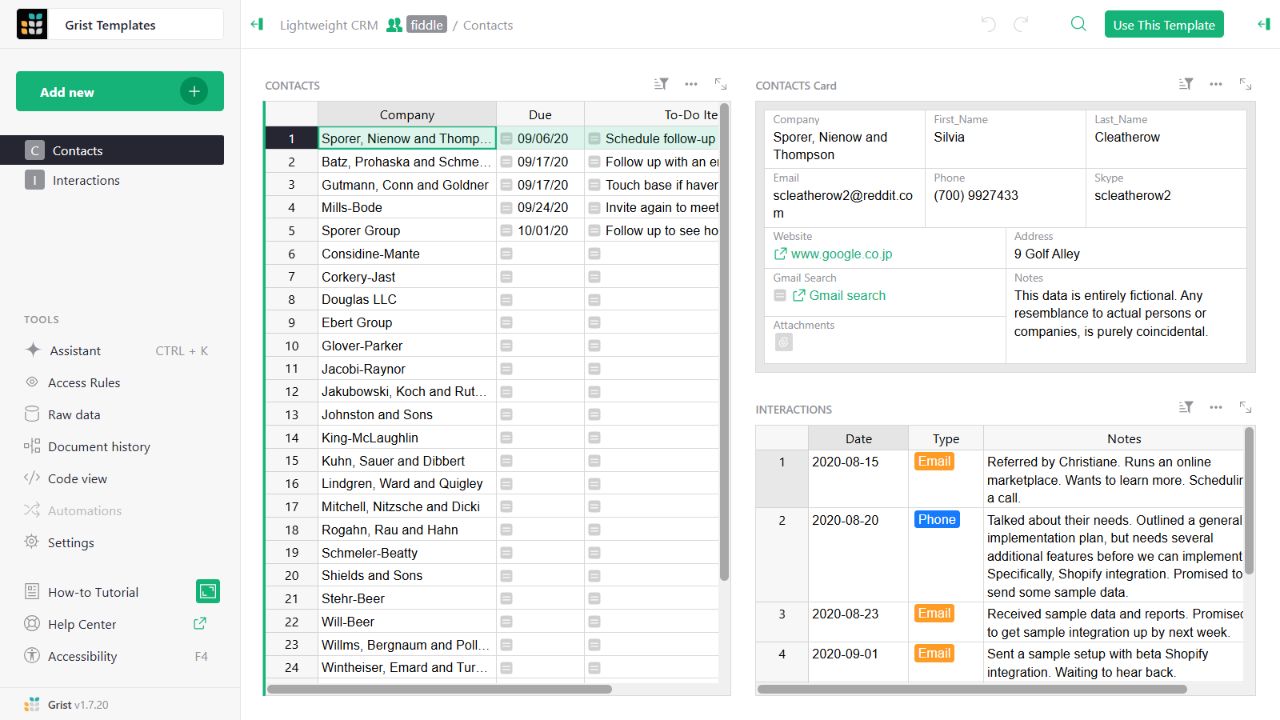
- Contact gridThe left widget lists sample companies and follow-up tasks.
- Detail cardThe upper-right widget presents fields for the selected contact.
- Related interactionsThe lower-right widget displays the sample interaction history.
Check the facts and their boundaries.
Official documentation supports the product statements. The evaluation procedures and synthetic examples are editorial guidance. We have not independently run the installation, migration or recovery procedures described here.
Document/home/session storage, persistence and optional external services. Reviewed 2026-11-01.