
Choose and verify document recovery without overstating the scope of an export.
Name the Recovery Object
Grist’s export guide describes a downloadable SQLite-based .grist document. Sharing information is excluded; external attachments require separate handling. Restoring a document therefore has a narrower scope than recovering users, workspaces and server configuration.
Write the recovery goal in ordinary language. “Recover the quoting document after an accidental change” and “rebuild the whole service after losing its server” require different inventories. Calling both a backup can conceal the work that remains after a file is downloaded.
Documentation: Grist: Exports and Backups
Choose a Document You Can Verify
Use a hypothetical quoting document containing three synthetic quotes, one calculation, a linked customer and an example file. Record each expected value independently. A restore check needs facts you can compare; merely opening a document only confirms that something opened.
Also record the intended owner and who should be able to view or edit it. Keep the access expectations separate from the downloaded document. That makes the excluded-sharing boundary visible instead of treating a new owner or missing collaborator as a surprising software defect.
Rehearse in a Separate Destination
The official guide describes importing a downloaded .grist file again. Use a separate test destination, not the only working document, for the rehearsal. Follow the current documented procedure and retain the original recovery artifact.
- Record the download time, source document and attachment placement.
- Store the artifact in an access-controlled recovery location.
- Import the copy into a separate test destination.
- Compare records, relationships and calculation results.
- Open the example attachment or follow the separate attachment procedure.
- Restore only the intended sharing after reviewing it.
Documentation: Grist: Exports and Backups
Record the Recovery Boundary
A successful rehearsal should produce a short record: which artifact was used, what was restored, what was manually recreated and which checks passed. If the procedure relies on knowledge held by one person, write down those decisions before calling the backup operational.
Set a retention and review policy appropriate to the document’s importance and rate of change. This guide does not prescribe a universal recovery time or backup interval. No restoration was executed for this article, and no recovery success rate is claimed.
Hypothetical quoting-document restore acceptance
This is an illustrative worksheet to adapt to your own evaluation. It is not a measured product test or a claim about results in your installation.
| Object | Expected After Restore | Separate Work |
|---|---|---|
| Three quotes | Same identities and values | Compare source manifest |
| Quote calculation | Same expected result | Check exceptional inputs |
| External file | Available after separate restoration | Retain attachment artifact |
| Collaborator access | Only intended roles | Reapply reviewed sharing |
A document backup is useful when a separate restoration demonstrates its scope and explicitly accounts for everything it excludes.
Inspect the official interface evidence
These previously captured interfaces provide orientation. Their versions and dates are distinct from the documentation review above.
Inspect the interface, with its context.
Open a specimen to see the source image and the observations it supports. A vendor demonstration is distinct from a self-hosted installation.
GristOfficial public demo · Demo identifies v1.7.20
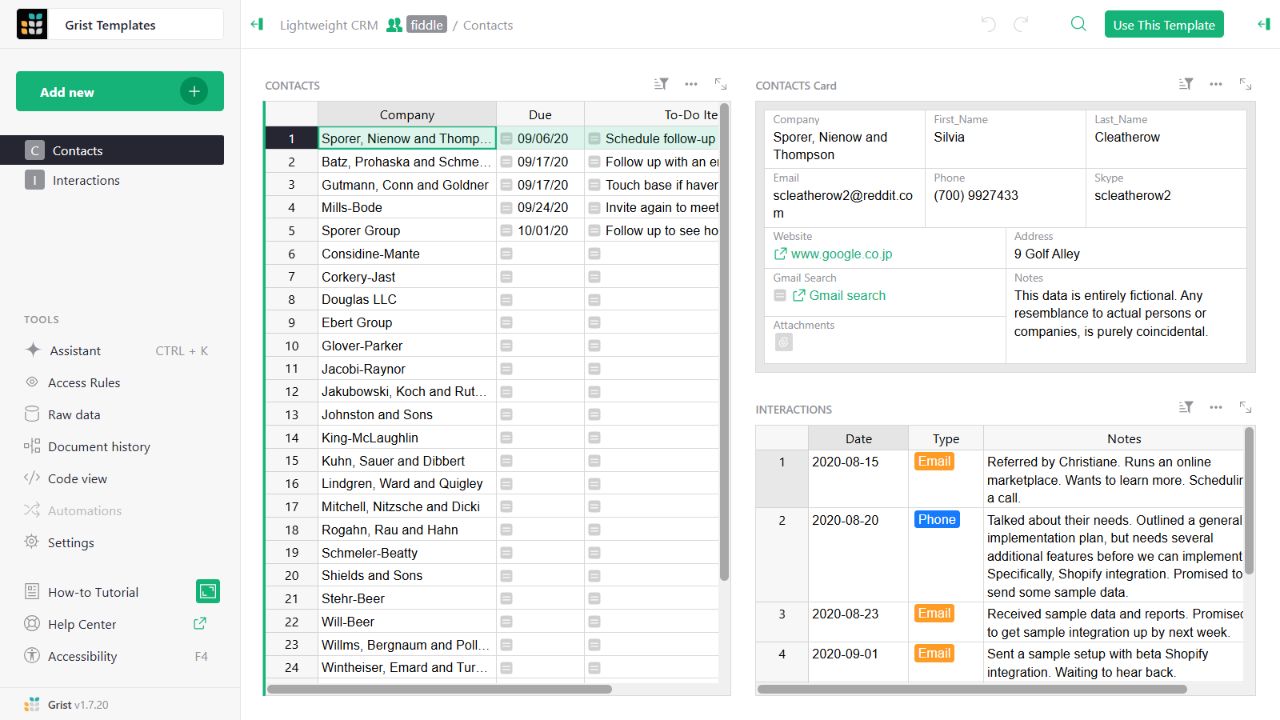
- Contact gridThe left widget lists sample companies and follow-up tasks.
- Detail cardThe upper-right widget presents fields for the selected contact.
- Related interactionsThe lower-right widget displays the sample interaction history.
Check the facts and their boundaries.
Official documentation supports the product statements. The evaluation procedures and synthetic examples are editorial guidance. We have not independently run the installation, migration or recovery procedures described here.
Document downloads, excluded sharing information and separate external-attachment restoration. Reviewed 2026-11-01.