
Represent relationships without confusing a displayed label with the linked record identity.
Separate Record Identity From Its Label
A Grist reference identifies a record in another table. The displayed column is configurable; the underlying value is the referenced row ID. A Reference List represents several such identities. This distinction explains why changing a display name need not mean creating a new relationship.
Consider two hypothetical customers both called Northside Services. Add a durable CustomerCode and a region to distinguish them. A list containing two identical names is a data-quality problem for the person choosing the relationship, even when the application has different row IDs internally.
Documentation: Grist: Reference and Reference Lists
Choose the Relationship Before Creating Columns
If each project has exactly one customer, put a Customer reference on Projects. If a project can serve several customers, describe whether that means shared ownership, billing shares or merely visibility. Those are different relationships and may deserve separate fields.
When the relationship itself needs attributes—such as a contact’s role on a project—consider a separate assignment table in your design. One row can then mean one project/contact assignment, with an explicit role and start date. This is a modeling recommendation, not a claimed automatic Grist conversion.
Create a Small Relationship Rehearsal
Make three synthetic customers and four projects. Include a customer with no projects and two customers with similar labels. Use the current Reference documentation to configure the column and its display value. Keep a temporary list of the expected customer code for each project.
- Create the parent records first and check their business keys.
- Configure the child reference to the intended table.
- Choose a display column that helps users distinguish records.
- Link each synthetic project and compare it with the expected code.
- Rename a customer label and confirm the intended link remains correct.
Documentation: Grist: Reference and Reference Lists
When a Link Looks Wrong
Check the target table, the selected record and the display column before editing the parent data. An unexpected name can be a display issue; a wrong identity requires correcting the relationship. Do not repair it by renaming an unrelated record to make the screen look right.
Also check imports and duplicates. A spelling variation can create a second business identity that appears plausible to users. Keep an exception list for unresolved matches and review those deliberately rather than linking every unmatched string to the first similar name.
Hypothetical customer/project link checks
This is an illustrative worksheet to adapt to your own evaluation. It is not a measured product test or a claim about results in your installation.
| Project | Intended Customer | What to Verify |
|---|---|---|
| P-101 | C-017 / Northside East | Correct identity despite similar names |
| P-102 | C-022 / Northside West | Display label is distinguishable |
| P-103 | No customer yet | Unresolved link stays visible |
| Rename C-017 | Same customer identity | Project still points to the intended record |
A readable label helps selection; a stable record relationship preserves meaning.
Inspect the official interface evidence
These previously captured interfaces provide orientation. Their versions and dates are distinct from the documentation review above.
Inspect the interface, with its context.
Open a specimen to see the source image and the observations it supports. A vendor demonstration is distinct from a self-hosted installation.
GristOfficial public demo · Demo identifies v1.7.20
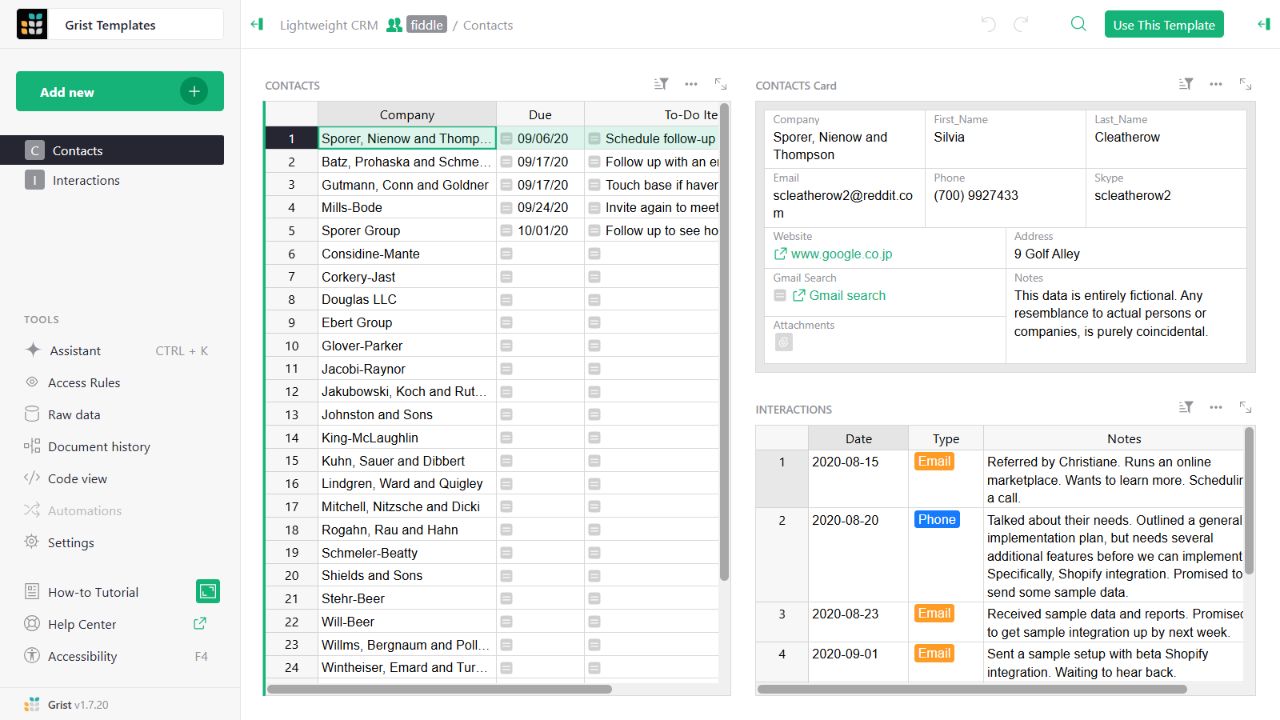
- Contact gridThe left widget lists sample companies and follow-up tasks.
- Detail cardThe upper-right widget presents fields for the selected contact.
- Related interactionsThe lower-right widget displays the sample interaction history.
Check the facts and their boundaries.
Official documentation supports the product statements. The evaluation procedures and synthetic examples are editorial guidance. We have not independently run the installation, migration or recovery procedures described here.
Reference identity, display columns and multiple relationships. Reviewed 2026-11-01.