
Connect a selector and detail widgets so users see the intended related records.
Model the Data Before the Page
Grist documents selection-driven links between widgets, including same-record and filter linking. The source widget acts as a selector; the receiving widget shows the related context. A visually adjacent pair of widgets is not automatically linked.
For a hypothetical customer service page, a Customers table can select one customer while a Projects table shows that customer’s projects. A separate contact card could show details for the selected customer. Decide which record each widget represents before arranging the layout.
Documentation: Grist: Linking Widgets
Make Selection Direction Unambiguous
The useful question is “when I choose this record, what should change?” Write that sentence for every connection. Avoid a layout where selecting a project unexpectedly changes the customer selector unless that behavior is intentional and understandable.
A customer with no projects is a necessary example. An empty project panel should mean there are no matching projects for that selection; it should not make the operator wonder whether the page failed to load. Add nearby explanatory text in the page design if the distinction matters.
Check a Small Master–Detail Workflow
Create synthetic customers Aster and Beacon. Give Aster two projects and Beacon one. Add Cedar with no projects. These names and counts are an illustrative fixture, not a test result from this project.
- Confirm every project references its intended customer.
- Create the customer selector widget.
- Add a project widget and choose the documented selection link.
- Select Aster, Beacon and Cedar in turn.
- Compare the displayed projects with the expected relationship list.
- Change the selected project and check whether unrelated widgets move unexpectedly.
Documentation: Grist: Linking Widgets
Keep Interface Filtering Separate From Access
A useful master–detail display helps users focus, but the layout does not itself express who is entitled to read every underlying record. Treat access as a separate requirement and validate it with the appropriate sharing and access-rule configuration.
If the wrong projects appear, inspect the selected source widget, target table and relationship column before changing records. A direction or relationship mismatch can look like missing data. Keep the data model intact while isolating the display problem, then confirm the corrected page against all three fixture customers.
Hypothetical selection-to-detail contract
This is an illustrative worksheet to adapt to your own evaluation. It is not a measured product test or a claim about results in your installation.
| Selected Customer | Expected Projects | Interpretation |
|---|---|---|
| Aster | A-1 and A-2 | Two related project records |
| Beacon | B-1 | One related project record |
| Cedar | None | Valid empty relationship |
| No intended selection | Defined by page design | Do not assume an empty panel is an error |
A linked page works when a selection leads to a predictable record set, including a deliberately checked empty case.
Inspect the official interface evidence
These previously captured interfaces provide orientation. Their versions and dates are distinct from the documentation review above.
Inspect the interface, with its context.
Open a specimen to see the source image and the observations it supports. A vendor demonstration is distinct from a self-hosted installation.
GristOfficial public demo · Demo identifies v1.7.20
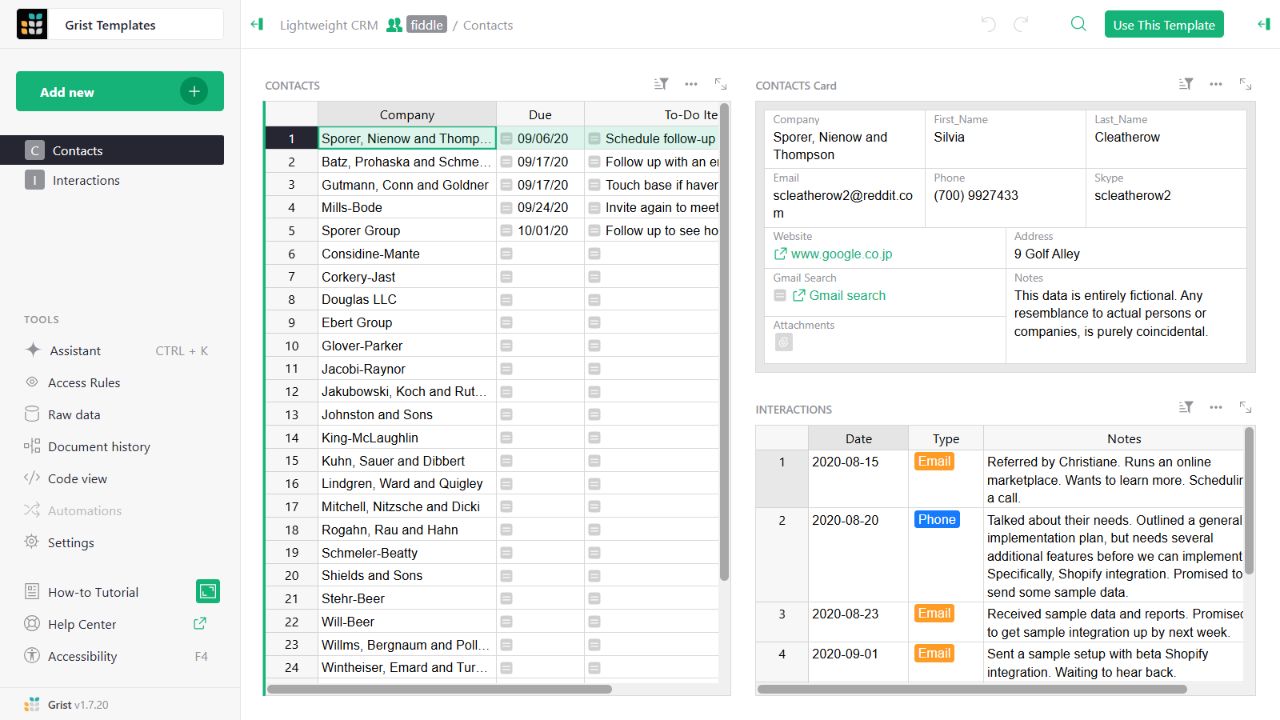
- Contact gridThe left widget lists sample companies and follow-up tasks.
- Detail cardThe upper-right widget presents fields for the selected contact.
- Related interactionsThe lower-right widget displays the sample interaction history.
Check the facts and their boundaries.
Official documentation supports the product statements. The evaluation procedures and synthetic examples are editorial guidance. We have not independently run the installation, migration or recovery procedures described here.
Selection-driven same-record and filter linking. Reviewed 2026-11-01.