
Define a complete recovery scope and the evidence needed to accept a backup as usable.
Identify what you actually operate
Baserow publishes different instructions for the all-in-one Docker image and a multi-service Compose installation. The Docker guide also describes persistent application data and optional external services. Choose documentation that matches your installation; do not apply a one-container assumption to an independently managed database or file store.
Make an inventory of the image/release, configuration, database, attachments, persistent volumes and any external service. Record who can recover the configuration without placing secret values in a public checklist. A backup file and the knowledge required to use it are separate dependencies.
Documentation: Baserow: Install with Docker · Baserow: Docker Compose installation source
Set the recovery question in business terms
Hypothetical example: a team can tolerate losing the last day of edits but needs its Jobs workspace available by the next working morning. Those are proposed objectives, not measured capability. Estimate them conservatively until an actual rehearsal establishes the duration and data gap.
Pick a representative fixture before the backup: a table with stable sample IDs, a relationship, a calculated result and an attached file. Record expected values in a separate acceptance sheet. Merely seeing a login screen after restoration does not establish that those components survived.
- Select the official release-matched procedure for the actual deployment type.
- Create the backup under the documented consistency conditions.
- Keep a protected copy separate from the original application host.
- Restore into a separate destination with external side effects disabled.
- Verify sample rows, relationships, calculations, files and user access.
- Record duration, failures and the recovery point actually achieved.
Keep the rehearsal separate from production
Use a destination that cannot send real workflow notifications or write back to business integrations. A restored copy may contain configuration that was appropriate in production but inappropriate for a rehearsal. Review those connections before allowing the copy to run ordinary background work.
Document the restoration steps that were necessary, including any missing configuration or permission changes. If a backup needs a particular image or database version, retain the exact version reference with the recovery record. Do not describe a dependency as “latest” when reproducing the old environment matters.
This page supplies a recovery-planning method and links to the official commands. It does not provide an independently tested backup script, a measured restoration time or a claim that a specific backup is complete. The acceptance sheet becomes evidence only after the operator actually performs and reviews the rehearsal.
Proposed Baserow recovery acceptance record
This is an illustrative worksheet to adapt to your own evaluation. It is not a measured product test or a claim about results in your installation.
| Component | What to verify | Result to record |
|---|---|---|
| Structured data | Known IDs and row totals | Match or explained difference |
| Relationships and formulas | Known linked record and expected output | Correct workflow behavior |
| Attachments | Open sample file | Readable restored file |
| Recovery objective | Observed duration and data age | Measured result, not target |
Treat a successful restoration rehearsal, not the existence of an archive, as the evidence that supports a recovery claim.
Inspect the official interface evidence
These previously captured interfaces provide orientation. Their versions and dates are distinct from the documentation review above.
Inspect the interface, with its context.
Open a specimen to see the source image and the observations it supports. A vendor demonstration is distinct from a self-hosted installation.
BaserowOfficial live template · Demo version not disclosed
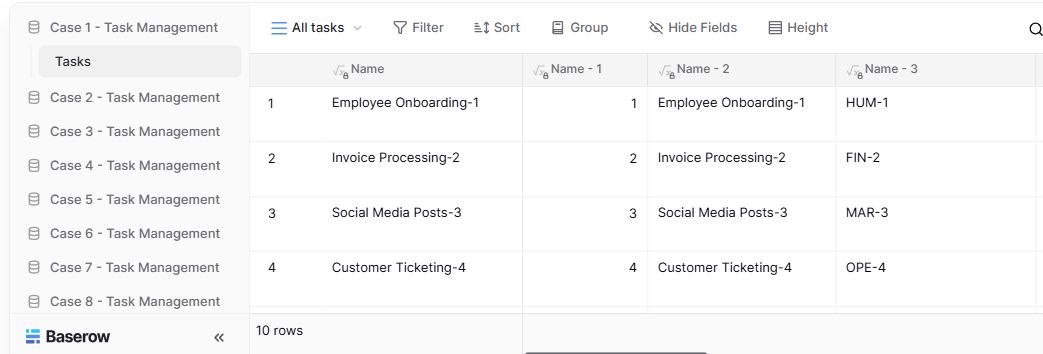
- Table navigationThe sidebar separates the demo’s task-management examples.
- View controlsFilter, sort, group and hide-field controls are visible in this preview.
- Calculated fieldsFormula columns display generated task names and identifiers.
Check the facts and their boundaries.
Official documentation supports the product statements. The evaluation procedures and synthetic examples are editorial guidance. We have not independently run the installation, migration or recovery procedures described here.
Official all-in-one installation, backup and upgrade instructions; not an executed restore. Reviewed 2026-11-01.
Develop-branch documentation, including version-dependent PostgreSQL upgrade notes; use release-matched instructions. Reviewed 2026-11-01.