
Retrieve and reconcile a complete row set without confusing a successful HTTP response with a complete extraction.
Read the schema-specific API contract
Baserow provides generated documentation for each database. Its general API reference describes listing rows with page and size parameters, with page numbering starting at one. Check the generated documentation for your destination before writing a client, especially field names, filtering and limits.
Decide what “complete” means: every row, only approved orders, or a saved extraction period. Store that definition with the job. A filtered request can be complete for its filter while containing fewer rows than the whole table. The comparison needs the same scope on both sides.
Documentation: Baserow: Database API documentation
Use a known fixture to expose truncation
Hypothetical example: a synthetic table contains 235 records and a client requests 100 per page. A complete extraction needs three pages with 100, 100 and 35 records if the dataset remains unchanged. Those counts illustrate the client logic; they are not observed API results.
Give each sample record a stable identifier. Preserve IDs when combining responses, detect repeated IDs and report gaps rather than merely counting the output array. Repeated pages can produce the right-looking file size while omitting an entire portion of the source.
- Record destination, table, filter, ordering and extraction start time.
- Request the documented first page with the intended credential.
- Continue through the documented pagination mechanism until completion.
- On a failed page, retry according to the error policy without silently skipping it.
- Reconcile unique identifiers and expected scope, then mark the extraction complete.
Account for edits during extraction
If records are added or removed while an offset/page-based job runs, the visible set may shift between requests. For a critical export, agree a quiet window or a reconciliation pass appropriate to the workflow. Do not promise snapshot consistency unless the actual API and process establish it.
Keep progress checkpoints that identify the job and its page rather than placing credentials in logs. A resumed job should not mix a previous filter with a new one. Record the extraction definition once and reject incompatible resume settings.
Separate transport failures from data failures. A missing page, a rejected credential, an invalid field and an unexpected record count need different explanations. Deliver a clearly failed job with a repair record rather than a plausible incomplete report labeled successful. Read-only extraction still needs care if a later process treats the file as authoritative.
Hypothetical 235-row extraction ledger
This is an illustrative worksheet to adapt to your own evaluation. It is not a measured product test or a claim about results in your installation.
| Request | Expected records | Completion check |
|---|---|---|
| Page 1 | 100 | IDs unique within job |
| Page 2 | 100 | No repeated first-page IDs |
| Page 3 | 35 | Final partial page handled |
| Reconciliation | 235 unique IDs | Same filter and extraction window |
An API export is complete only when pagination and the intended record set have both been reconciled.
Inspect the official interface evidence
These previously captured interfaces provide orientation. Their versions and dates are distinct from the documentation review above.
Inspect the interface, with its context.
Open a specimen to see the source image and the observations it supports. A vendor demonstration is distinct from a self-hosted installation.
BaserowOfficial live template · Demo version not disclosed
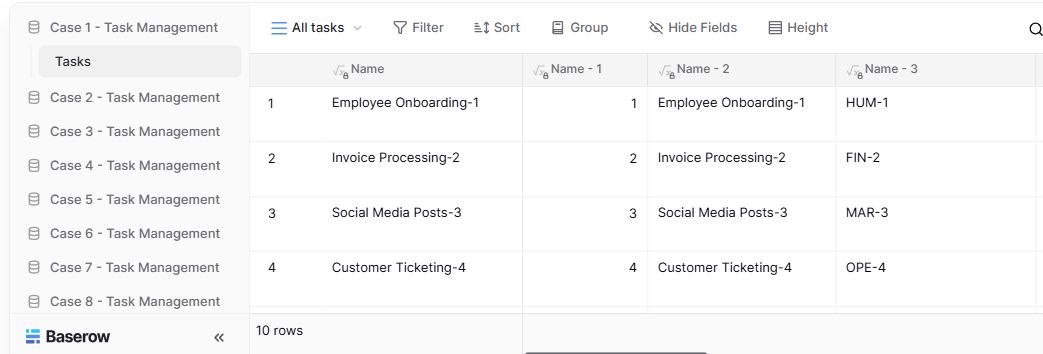
- Table navigationThe sidebar separates the demo’s task-management examples.
- View controlsFilter, sort, group and hide-field controls are visible in this preview.
- Calculated fieldsFormula columns display generated task names and identifiers.
Check the facts and their boundaries.
Official documentation supports the product statements. The evaluation procedures and synthetic examples are editorial guidance. We have not independently run the installation, migration or recovery procedures described here.
REST row endpoints, authentication and pagination; generated instance documentation remains authoritative for a schema. Reviewed 2026-11-01.