
Use the current official installation instructions
The official guide is the starting point for installation. Check its supported environment, image/version guidance and configuration before running commands. We have not published an independently tested configuration yet.
Plan persistent data and access
Identify all persistent data and secrets. Decide who should reach the application and which users require administrative access. Avoid copying a development example directly into a public deployment.
Verify health and recovery
After setup, check the documented health behavior, create a small sample, and perform a recovery rehearsal. Record the environment and exact version so the result can be reproduced.
Choose an upgrade and rollback process
Read release notes and the current upgrade guidance before changes. Keep a usable recovery point, and test important workflows after the update.
Choose the documented topology first
Baserow’s Docker Compose documentation distinguishes a simple all-in-one configuration from a setup with separate service containers. Decide which documented path you intend to operate before copying configuration. Mixing a volume path from one arrangement with another is not a deployment plan. Keep the matching official instructions beside your configuration review.
Prepare a configuration inventory
Record the public address, application release, persistent stores and required external services. Identify how credentials are supplied and who can change them. Do not commit real secrets into the site repository or an example file. The inventory should describe dependencies without publishing their secret values.
- Identify the version or image you intend to run.
- Record the documented persistent-data locations for that topology.
- Check the intended public URL and access/authentication configuration.
- Assign responsibility for updates, logs, database state and uploaded files.
Accept operation only after a recovery rehearsal
A responsive login screen is an initial smoke check, not acceptance of the complete installation. Create synthetic records and a file, exercise a normal-user workflow, then use the supported backup procedure to recover into a separate environment. Record what actually happened and any dependency you had to discover during restoration. Commands in the vendor guide remain documentation until you execute and verify them in your own environment.
Inspect the interface, with its context.
Open a specimen to see the source image and the observations it supports. A vendor demonstration is distinct from a self-hosted installation.
BaserowOfficial live template · Demo version not disclosed
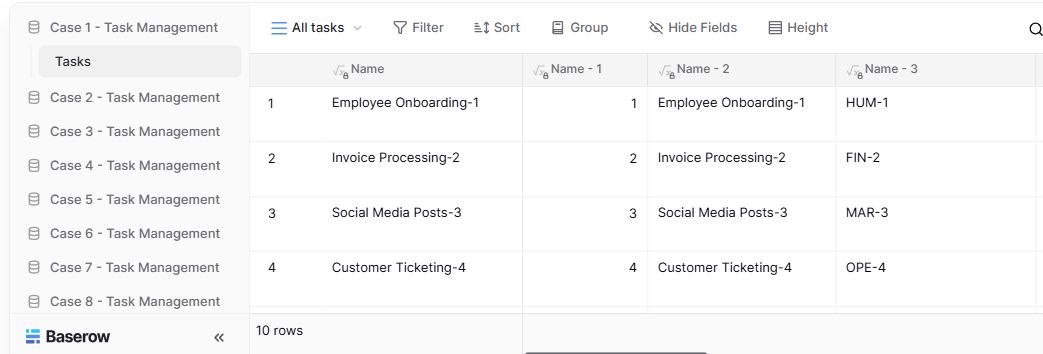
- Table navigationThe sidebar separates the demo’s task-management examples.
- View controlsFilter, sort, group and hide-field controls are visible in this preview.
- Calculated fieldsFormula columns display generated task names and identifiers.
Follow the documentation.
Consult the current official instructions before making changes. No independent deployment benchmark is claimed here.
baserow.ioOfficial documentation ↗baserow.ioOfficial documentation ↗