
Choose an operating model rather than comparing product names or subscription costs alone.
Make the Hosting Boundary Concrete
NocoDB describes self-hosting as running the application on infrastructure you control, with control over upgrade timing. Its installation documentation offers local, single-server and custom-infrastructure paths. These choices describe where operations happen; they do not prove that every Cloud capability exists in Community.
Write down your nonnegotiable requirement first. “Our team wants control” is hard to verify. “Only the private network can reach this application” or “we must schedule updates outside warehouse hours” gives the reviewer something observable to check.
Documentation: NocoDB self-hosting paths and requirements
Assign the Work That Continues After Installation
Use a responsibility map with names, not only departments. Assign updates, monitoring, authentication, file storage and restore decisions. Record who covers absence and where access is stored. A server with no maintenance owner is not an operating model, even if the first login succeeds.
Hypothetical example: a three-person support team needs a shared ticket register but has no person available for server incidents. Their comparison should include a hosted option and an exit plan. A different team with an established platform group may already have an appropriate backup and incident process.
- Name an owner for the application and each external dependency.
- Choose the service window and acceptable interruption.
- Decide who can authorize an upgrade or restore.
- Write the handover instructions so another person can follow them.
Compare the Required Edition
List capabilities as concrete acceptance tests: an invited user signs in with the chosen identity method; a reporting integration sees only the intended data; an operator can review the required history. Read the current plan source for each. Do not compare a paid demonstration with an unlicensed deployment as if the environment were the only difference.
Also record what happens if the team changes plans or leaves the service. An export rehearsal and a retained schema description are useful regardless of the hosting choice. They reveal dependence on views, formulas or integration behavior that row data alone does not preserve.
Write a Conditional Decision
A useful conclusion sounds like: choose the documented option that meets the required workflow, access boundary and recovery process with an owner who can maintain it. Keep unresolved requirements visible. Do not turn an untested sizing estimate or an unavailable entitlement into a checkmark. Revisit this record when the audience, workload or staffing changes.
Editorial hosting decision worksheet
This is an illustrative worksheet to adapt to your own evaluation. It is not a measured product test or a claim about results in your installation.
| Requirement | Self-hosted evidence to collect | Cloud evidence to collect |
|---|---|---|
| Operating responsibility | Named maintenance and recovery owners | Service responsibilities and escalation path |
| Required capability | Exact edition and workflow check | Selected plan and workflow check |
| Exit | Backup scope and successful restoration | Export contents and destination rehearsal |
| Change control | Pinned release and maintenance window | Documented service/update expectations |
Choose the hosting model your team can operate, then verify the edition separately. Do not let a familiar interface hide a missing responsibility.
Inspect the official interface evidence
These previously captured interfaces provide orientation. Their versions and dates are distinct from the documentation review above.
Inspect the interface, with its context.
Open a specimen to see the source image and the observations it supports. A vendor demonstration is distinct from a self-hosted installation.
NocoDBHistorical vendor product image · Image identifies v2.3; not the current release
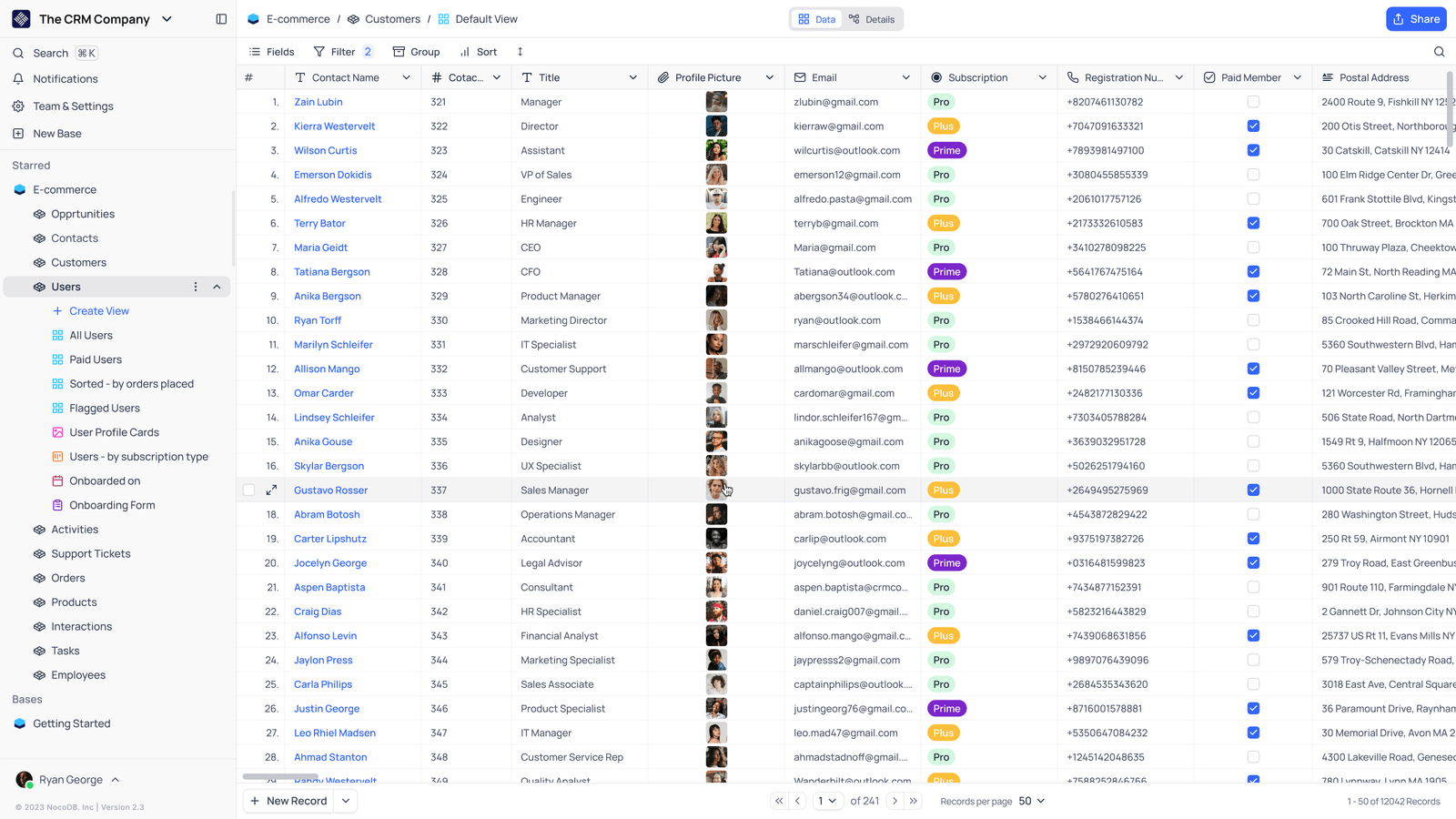
- Saved viewsThe vendor image shows several named views in the left navigation.
- Grid controlsFields, filtering, grouping and sorting appear above the record grid.
- Typed columnsThe example includes text, email and labelled select values. Check the current edition for availability.
Check the facts and their boundaries.
Official documentation supports the product statements. The evaluation procedures and synthetic examples are editorial guidance. We have not independently run the installation, migration or recovery procedures described here.
Current documented requirements and installation choices; not an independent capacity test. Reviewed 2026-11-01.