
Create a calculation with independently specified expected results rather than trusting a formula that merely saves.
Start with an expected result
Baserow’s formula documentation describes computed fields that recalculate from other fields. It uses field references such as field('Quantity') and notes that names must match the field. Those mechanics help express a rule; they do not decide what the rule should mean.
Hypothetical example: a workshop calculates a line subtotal from quantity and unit price, then subtracts a line discount. Agree whether the discount is a dollar amount or a percentage, whether it applies before tax, and how negative quantities represent returns. Each interpretation produces a different answer.
Documentation: Baserow: Formula field overview
Build an independent answer sheet
For an illustration, three units at $12 with a $5 line discount should produce a $31 subtotal before tax. That number is ordinary arithmetic for this example, not a measurement from Baserow. Include a zero-quantity line, a missing price and a return so the evaluation does not consist only of the easiest input.
Write the expected handling of a missing value explicitly. A blank price may mean “awaiting quotation,” which should be reviewed rather than silently treated as free. The appropriate handling depends on the workflow; do not copy a default just because another spreadsheet used it.
- List input fields and their units.
- Describe the rule without formula syntax.
- Calculate expected answers for normal and exceptional rows.
- Create the Formula field using the installed editor and exact field names.
- Compare every sample result and explain mismatches before using the field.
Treat formula changes as workflow changes
Give an important calculated field a short description explaining its purpose and assumptions. A future editor should be able to tell whether a shipping charge is per unit, per order or per delivery. Without that context, a tidy expression can become a source of disputes.
When importing from another tool, rebuild the rule rather than translating function names mechanically. Date boundaries, rounding, blank handling and relationship aggregation may need different treatment. Keep the original expected-answer sheet so the rebuilt field can be judged against the same meaning.
After changing a field name, type or dependency, rerun the sample rows. For financial or contractual outputs, have the responsible person approve the business rule separately from the person who entered the expression. This review method improves accountability but does not constitute an accounting or compliance assessment.
Hypothetical subtotal validation cases
This is an illustrative worksheet to adapt to your own evaluation. It is not a measured product test or a claim about results in your installation.
| Inputs | Expected business outcome | What to investigate |
|---|---|---|
| 3 × $12, $5 line discount | $31 before tax | Discount unit and application order |
| Zero quantity | Agreed zero or review state | Missing versus zero input |
| Missing price | Flag for quotation review | Avoid accidental free item |
| Negative quantity | Agreed return treatment | Sign and discount behavior |
A useful formula has a documented rule and an answer sheet that survives changes to the expression.
Inspect the official interface evidence
These previously captured interfaces provide orientation. Their versions and dates are distinct from the documentation review above.
Inspect the interface, with its context.
Open a specimen to see the source image and the observations it supports. A vendor demonstration is distinct from a self-hosted installation.
BaserowOfficial live template · Demo version not disclosed
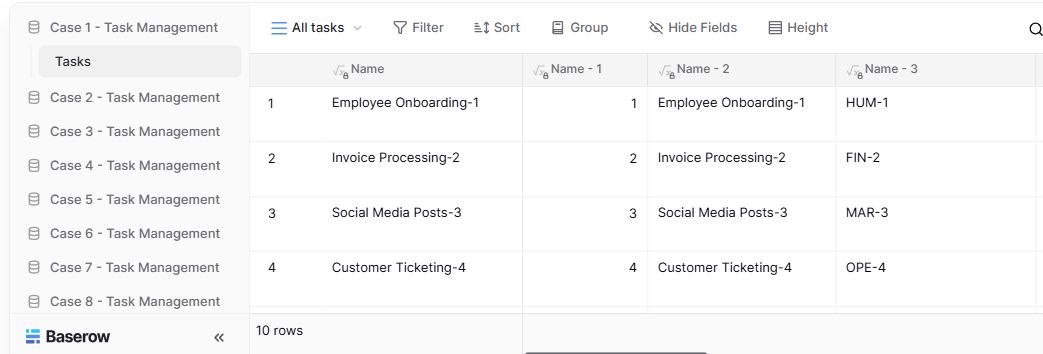
- Table navigationThe sidebar separates the demo’s task-management examples.
- View controlsFilter, sort, group and hide-field controls are visible in this preview.
- Calculated fieldsFormula columns display generated task names and identifiers.
Check the facts and their boundaries.
Official documentation supports the product statements. The evaluation procedures and synthetic examples are editorial guidance. We have not independently run the installation, migration or recovery procedures described here.
Documented formula model and field references; examples here are proposed exercises. Reviewed 2026-11-01.